2026-09-30 · Engineering · 5 min read · Kouakou Ghislain Boris
useAgentTool: how a tool is born, runs and goes away
In OwlLayer AI, a tool is a business action the agent is allowed to trigger: a name, a description the model reads, an argument schema, a risk level and a handler. This article follows a React tool from birth to removal, and explains what the runtime does at each step.
The problem with a central tools file
Most agent frameworks ask you to define tools in a central configuration: one big object listing every possible action, with schemas, descriptions and handlers.
That file lives far from the components it drives. When someone changes a button, they have to remember to update the tool definition. Often they forget, and the agent keeps offering an action the interface no longer allows. Worse, the model sees every action of the application all the time, including those of screens the user never opened.
The tool lives in the component
useAgentTool declares the tool inside the component that owns the action, next to the state it needs.
import { useAgentTool } from '@owllayer/react';import { z } from 'zod'; function DeleteAccountButton({ userId }: { userId: string }) { useAgentTool( { name: 'delete_account', description: 'Permanently delete the current user account', schema: z.object({ reason: z.string().optional() }), risk: 'critical', }, async ({ reason }) => { await deleteAccount(userId, reason); return { status: 'deleted' }; }, ); return <button onClick={() => deleteAccount(userId)}>Delete account</button>;}The handler reads userId straight from the props. The risk is critical: nothing runs without the user's explicit consent. The component and its AI capability cannot drift apart, because they are written in the same place.
Birth: registration
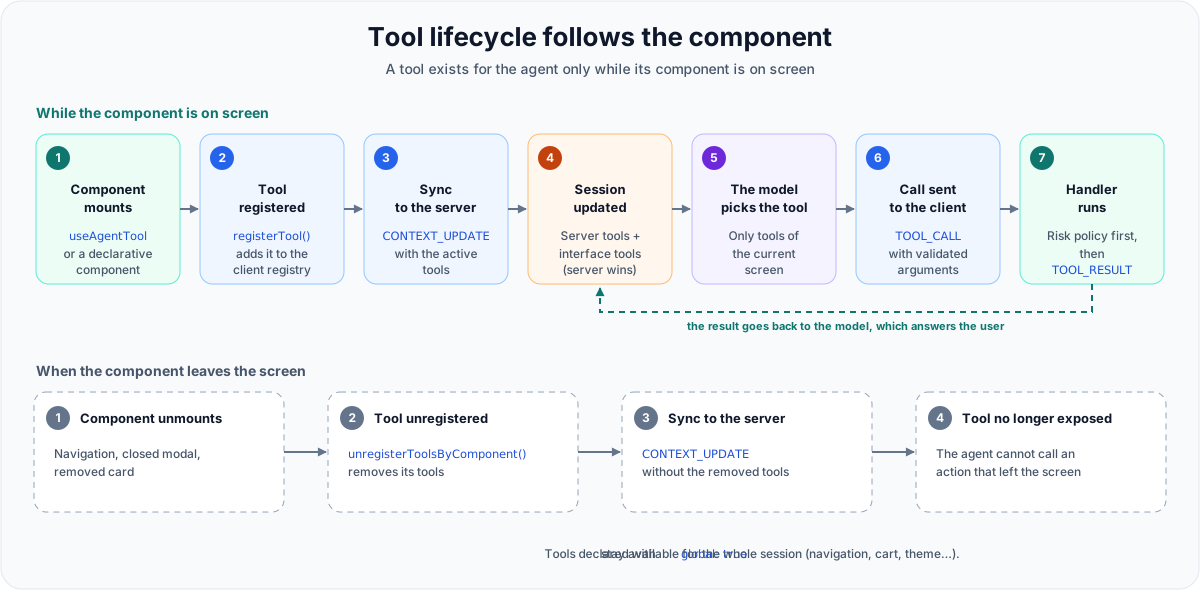
When the component mounts, the hook turns the definition into a tool declaration (the Zod schema becomes a JSON Schema the model can read) and registers it in the client registry.
That registry is the same ToolRegistry the server uses, so the rules are identical on both sides:
- one name, one tool: registering the same name again replaces the tool instead of duplicating it;
- each tool belongs to a component, so all the tools of a component that goes away can be removed at once;
- a limit of active tools per session, 30 by default. Above it, the tool is refused and the refusal is reported (
tool.registry.limitevent andonError) instead of failing silently. The limit is set on the server withmaxActiveTools, which announces it to the client on connection.
Each registry change schedules a synchronization. Changes made during the same render are batched: when a page mounts ten components, the server receives one CONTEXT_UPDATE with the new list, not ten.
Life: execution
When the model decides to call delete_account, the server sends a TOOL_CALL to the client. The client executor always runs the same steps:
- it finds the tool in the registry. An unknown tool returns an error to the model;
- it validates the arguments against the schema. If they are invalid, the model receives
Validation args "delete_account": …and can fix its call. No approval is ever requested for an invalid call; - it applies the risk policy: run directly for
none, notify forlow, approval forhighandcritical; - it runs your handler with the validated arguments, schema defaults already applied, and waits for the Promise it returns;
- it sends a
TOOL_RESULTto the server, which passes it to the model.
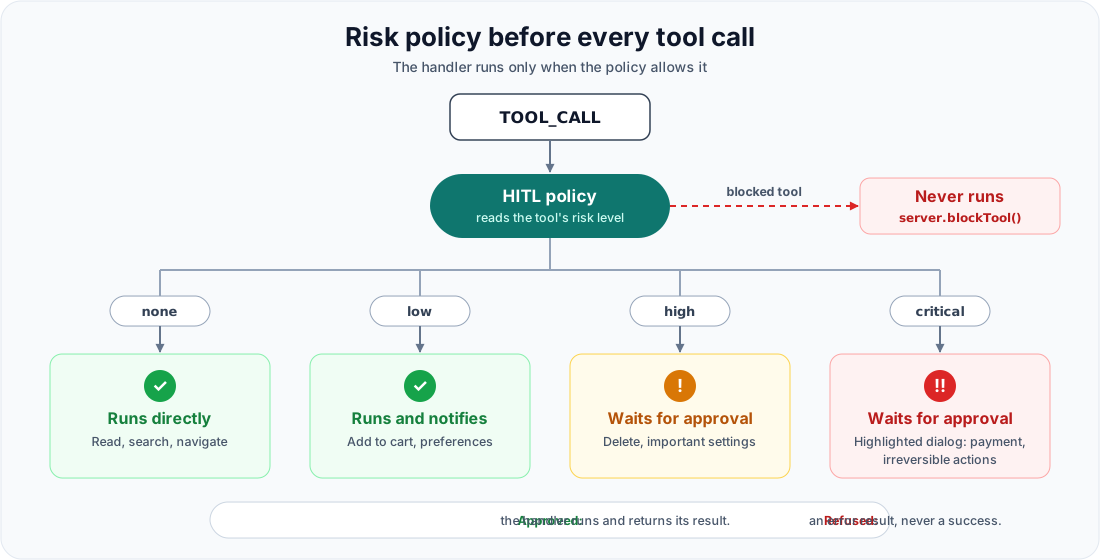
The order of steps 2 and 3 matters. Validating before approving guarantees that nobody is ever asked to accept an action whose arguments are wrong.
Two details make execution reliable. The handler is kept in a ref updated on every render: it always sees the current props and state, without registering the tool again. And if the handler navigates, the result is sent once the new page has registered its tools, so the model continues with the actions of the new screen.
The contract to remember: the runtime awaits only the Promise returned by the handler. Any async work the result depends on must be awaited or returned.
Removal: unregistration
When the component unmounts, its tools leave the registry and the server receives the new list. The agent can only call what is actually on screen.
Some actions must survive navigation: navigate, open_cart, logout. Declare them with global: true:
useAgentTool( { name: 'open_cart', description: 'Open the cart page', risk: 'none', global: true }, () => navigate('/cart'),);A global tool stays registered until it is removed explicitly. The practical rule: if the user can no longer see the object or the screen, the model should no longer see the matching tool. Keep global for actions that make sense everywhere.
Grouping tools: resolvers
When a domain has several actions (the cart: view, remove, empty), declaring them one by one gets verbose. useAgentToolResolver groups them in a single block:
useAgentToolResolver( { cart: { prefix: 'cart_', tools: { view: { description: 'List the cart items', schema: z.object({}), risk: 'none', handler: () => cart.items }, remove: { description: 'Remove an item from the cart', schema: z.object({ productId: z.string() }), risk: 'high', handler: ({ productId }) => cart.remove(productId), }, }, }, }, { onErrorAnyCall: (name, _args, error) => toast.error(`${name}: ${error.message}`) },);A resolver is an aggregator: it prefixes names (cart_view, cart_remove), registers every tool under the same component, avoids registering them again on each render, and adds shared hooks (onBeforeAnyCall, onAfterAnyCall, onErrorAnyCall) for logs or notifications. Validation and the risk policy stay with the executor: an invalid call is refused before the handler and before the hooks, just as with useAgentTool.
Why a live registry matters
A static registry describes what your product could do. A live registry describes what it can do right now. Open a dialog and its actions appear; change page and they disappear. The model always works from a faithful picture of the interface in front of the user. That is what makes its actions understandable, bounded, and safe to approve.
Going further
- The tools guide: global tools, validation, the limit, anti-patterns.
- The React SDK and its Vue, Svelte, Angular and HTML counterparts.
- The step-by-step guide: make a React store operable by an agent.